For many 10–50-employee law firms, managed IT services handle the day-to-day technology work: help desk support, monitoring, patching, Microsoft 365, backups, cybersecurity, and device management.
But managed IT alone may not answer the bigger questions:
What should we budget for technology next year? Which systems should we replace first? Are we spending money in the right places? How should cybersecurity risk affect our technology decisions? What technology will we need as the firm grows?
That's where a virtual Chief Information Officer (vCIO), or strategic IT advisor, can add value.
A simple way to understand the difference is:
Managed IT keeps today's technology operating. A vCIO helps leadership plan what technology should look like over the next 12–36 months.
For a growing law firm, the strongest model often combines both.
What Is a vCIO?
A vCIO provides strategic technology leadership without the firm needing to employ a full-time Chief Information Officer.
The role is different from a help desk technician or network engineer.
Instead of primarily asking:
"How do we fix this?"
a vCIO should be helping leadership ask:
"What should we do next—and why?"
Depending on the firm's needs, vCIO responsibilities can include:
- Technology budgeting
- Strategic IT planning
- Hardware lifecycle planning
- Cybersecurity strategy
- Risk management
- Business continuity planning
- Vendor management
- Cloud strategy
- Microsoft 365 planning
- Technology policy development
- Cyber insurance readiness
- Project prioritization
- Technology planning for growth
- Regular leadership reviews
The purpose isn't to make technology more complicated.
It's to connect technology decisions to business priorities.
Managed IT vs. vCIO: What's the Difference?
The easiest way to separate the two is to look at the questions each function should answer.
| Managed IT | vCIO |
|---|---|
| Is the network working? | Is the network appropriate for where the firm is going? |
| Can the employee access email? | Are we using Microsoft 365 effectively and securely? |
| Are backups running? | Does our recovery strategy meet the firm's business requirements? |
| Is the computer patched? | When should we replace our computers? |
| Is MFA enabled? | Does our cybersecurity strategy match our risk? |
| Can we fix this problem? | Why does this problem keep happening? |
| What needs attention today? | What should we plan and budget for over the next 12–36 months? |
Both are important.
The mistake is assuming they're the same service.
The 5 Areas Where a vCIO Can Help a Law Firm
For a small or midsize law firm, vCIO planning should be practical.
It should focus on decisions leadership actually needs to make.
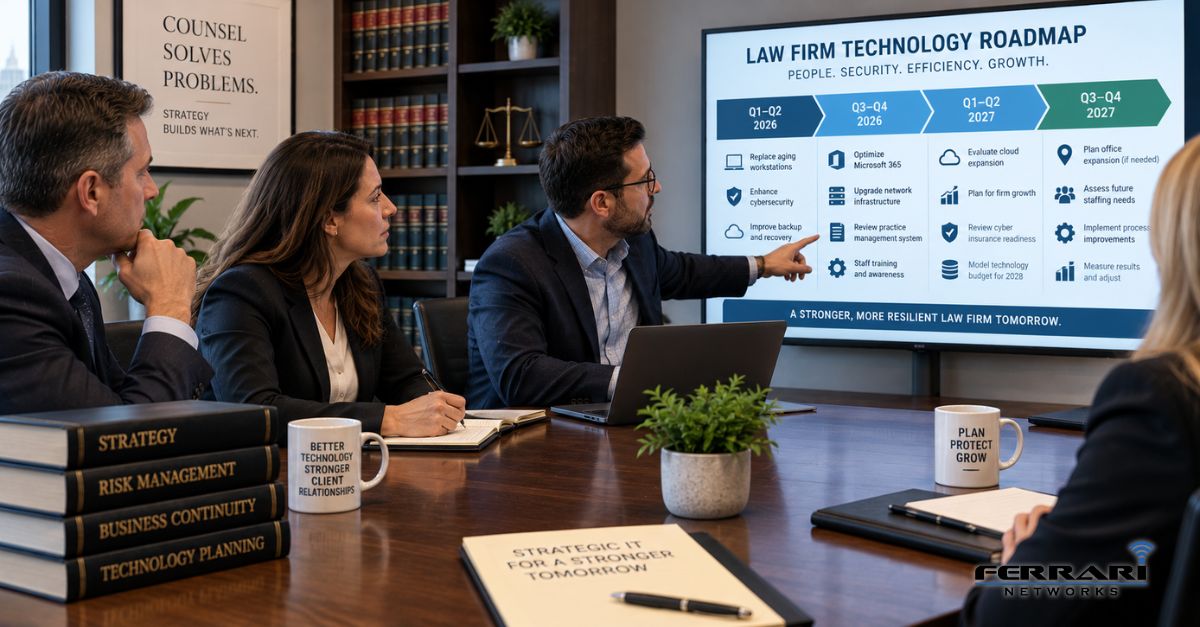
1. Build a 12–36 Month Technology Roadmap
Technology becomes expensive when every purchase is an emergency.
A firewall fails unexpectedly.
Ten computers become obsolete at the same time.
A server reaches end of life.
A software vendor changes its requirements.
A cyber insurance application exposes security gaps.
Suddenly, the firm is approving projects it didn't budget for.
A technology roadmap changes that.
For a 10–50 employee law firm, a useful roadmap might identify:
- Computers due for replacement
- Servers approaching end of life
- Firewall and network upgrades
- Microsoft 365 improvements
- Cybersecurity projects
- Backup and recovery improvements
- Practice management changes
- Cloud migrations
- Internet redundancy
- Office moves or expansions
- Employee growth
- Major software renewals
Each initiative should have a priority, approximate timeline, business reason, and expected budget impact.
Instead of asking, "Why are we suddenly spending $15,000 on IT?"
leadership should already know the project is coming.
2. Create a Predictable IT Budget
Technology planning and financial planning should work together.
A vCIO should help the firm understand several categories of technology spending:
Recurring costs
Managed IT, Microsoft 365, cybersecurity services, cloud applications, backup services, telecommunications, software subscriptions, and other ongoing expenses.
Lifecycle costs
Computers, servers, firewalls, network equipment, battery backups, and other hardware that eventually needs replacement.
Strategic projects
Cloud migrations, office expansions, practice-management changes, security improvements, and other larger initiatives.
Contingency and risk
Unexpected failures and projects that may become necessary because of security, compliance, insurance, or vendor changes.
The objective isn't to predict every technology expense perfectly.
It's to eliminate as many avoidable surprises as possible.
For firms already paying approximately $150–$200 per user per month for managed IT, strategic planning also helps leadership understand what is included in that recurring service and which future projects need separate budgeting.
3. Turn Cybersecurity Into a Business-Risk Conversation
Cybersecurity can become overwhelming when leadership receives a long list of technical recommendations without context.
A vCIO should help translate technical findings into business decisions.
Instead of saying:
"You need another security tool."
The conversation should explain:
- What risk are we addressing?
- What systems or information are affected?
- How significant is the risk?
- Is there an insurance or contractual consideration?
- What happens if we don't address it?
- What are our options?
- What does each option cost?
- What should happen first?
This aligns with the risk-management approach of the NIST Cybersecurity Framework 2.0.
NIST CSF 2.0 organizes cybersecurity risk management around six functions:
Govern → Identify → Protect → Detect → Respond → Recover
Adding Govern in CSF 2.0 reinforces an important point for law-firm leadership: cybersecurity isn't solely an IT department issue. Governance, priorities, responsibilities, and risk decisions belong at the organizational level.
A vCIO can help bring those conversations to leadership in understandable business terms.
4. Connect Technology Planning to Business Continuity
One of the questions every law firm should be able to answer is:
"What technology failure would prevent the largest number of employees from working?"
Then ask:
"What is our plan if that happens?"
A vCIO should help identify critical dependencies such as:
- Internet connectivity
- Microsoft 365
- Document management
- Practice management
- Servers
- Cloud applications
- Phones
- Remote access
- Backup infrastructure
Leadership can then decide which systems require redundancy, faster recovery, alternative processes, or additional investment.
NIST's Cybersecurity Framework 2.0 includes Respond and Recover as core functions, emphasizing that organizations should prepare not only to protect systems but also to manage incidents and restore normal operations.
For a law firm, this becomes a business question:
How long can we operate without this system?
Understanding the IT mistakes that cause law firm downtime can also help leadership identify which risks deserve priority in the technology roadmap.
That's more useful than simply asking whether the system is "backed up."
It also means verifying that backups actually work through regular backup testing, rather than assuming successful backup notifications guarantee successful recovery.
Internal link opportunity: Link to What IT Mistakes Cause the Most Downtime for Small Law Firms?
5. Hold Regular Strategic Technology Reviews
A technology plan created once and never reviewed quickly becomes outdated.
For many 10–50 employee firms, a practical cadence is a structured technology review at least quarterly, with additional planning around major business changes.
The meeting shouldn't become a review of help desk tickets.
It should focus on leadership-level questions such as:
- What changed since our last review?
- What technology risks need attention?
- What projects are approaching?
- Which equipment needs replacement?
- Are recurring IT problems revealing a larger issue?
- Has the firm's headcount changed?
- Are new offices, hires, or practice areas planned?
- Are cybersecurity priorities changing?
- Are there cyber insurance considerations?
- Does our technology budget need adjustment?
A useful meeting should end with specific decisions, owners, priorities, and dates.
Otherwise, it's just another meeting.
Does Every Small Law Firm Need a vCIO?
Not necessarily.
A five-person firm with simple technology, limited growth, and few systems may not need a formal vCIO process.
But the need for strategic IT planning tends to increase as the environment becomes more complex.
A law firm should consider a vCIO-style relationship when several of these are true:
- The firm has 10–50 employees
- Leadership is regularly surprised by IT expenses
- Technology decisions are made reactively
- The firm has recurring cybersecurity concerns
- Nobody owns the technology roadmap
- Hardware replacement isn't planned
- Cyber insurance creates technical questions leadership can't answer
- The firm is growing
- The firm is opening or relocating offices
- Multiple technology vendors need coordination
- Leadership doesn't know what technology projects are coming next
- IT discussions happen primarily when something breaks
If several of those sound familiar, the problem may not be poor technical support.
It may be missing technology leadership.
What Should a Law Firm Expect From a vCIO?
A vCIO shouldn't simply show up quarterly with a sales proposal.
The relationship should produce tangible outputs.
For a 10–50 employee law firm, that might include:
A documented technology roadmap
Projects and priorities for the next 12–36 months.
An IT budget forecast
Expected recurring expenses, hardware replacements, and major projects.
An asset lifecycle plan
Which systems should be replaced and when.
A cybersecurity roadmap
Risks prioritized according to business impact rather than fear.
Business continuity priorities
Critical systems, recovery expectations, and identified single points of failure.
Project planning
Clear priorities and timelines for major technology initiatives.
Leadership reporting
Technology information presented in language that managing partners and administrators can use to make decisions.
If your vCIO relationship doesn't produce actionable planning, ask what you're actually receiving.
The Ferrari Networks 4-Part Strategic IT Planning Framework
A practical technology strategy for a law firm can be organized around four questions.
1. Where Are We Now?
Document the current environment.
Review:
- Hardware
- Software
- Cloud services
- Cybersecurity
- Backups
- Network infrastructure
- Vendors
- Recurring IT problems
- Current spending
2. Where Are the Risks?
Identify issues that could affect:
- Security
- Productivity
- Reliability
- Client service
- Business continuity
- Cyber insurance
- Growth
Then prioritize them.
Not every problem deserves immediate investment.
3. Where Is the Firm Going?
Technology planning should reflect the firm's actual business plans.
Ask:
- Are we hiring?
- Opening another office?
- Adding a practice area?
- Increasing remote work?
- Changing software?
- Moving more systems to the cloud?
- Planning an acquisition or merger?
Technology should support those plans, not react to them afterward.
4. What Happens Next?
Turn the findings into a roadmap.
For every major initiative, identify:
Priority → Timeline → Owner → Budget → Business reason
That's what converts an IT assessment into a strategy.
Example: What Strategic IT Planning Could Look Like for a Western New York Law Firm
Consider a 30-employee Western New York law firm with reliable day-to-day IT support but little long-term planning.
The firm isn't experiencing a major technology crisis.
But leadership keeps encountering surprises.
Several computers need replacement.
The firewall is approaching end of life.
Cyber insurance renewal raises questions about security controls.
The firm's backup system needs review.
Leadership is also considering adding another office within the next 18 months.
Instead of addressing each issue independently, the firm develops a 24-month technology roadmap.
The plan prioritizes:
0–6 months: Address the highest-risk cybersecurity and recovery issues.
6–12 months: Replace aging equipment and standardize systems.
12–18 months: Prepare technology and connectivity for expansion.
18–24 months: Review longer-term cloud, security, and productivity initiatives.
Now technology decisions can be incorporated into the firm's budget and business planning.
The value isn't that the firm buys more IT.
The value is that leadership knows what's coming, why it matters, and approximately when money will need to be spent.
10 Questions to Ask Your Current IT Provider
Want to know whether you're receiving strategic IT guidance?
Ask:
- Can you show us our 12–36 month technology roadmap?
- Which equipment will we need to replace during the next 12 months?
- What technology expenses should we budget for next year?
- What are our three biggest technology risks?
- What are our three biggest cybersecurity priorities?
- How quickly could we recover our critical systems after an outage?
- Which recurring support problems should we eliminate permanently?
- How does our technology plan support the firm's growth plans?
- What projects should we prioritize—and why?
- When is our next strategic technology review?
If your provider can answer those questions clearly, you may already be receiving strong strategic guidance.
If the conversation always comes back to support tickets, computers, and troubleshooting, you may be receiving IT support without IT strategy.
vCIO Readiness Checklist for a 10–50 Employee Law Firm
Use this quick assessment:
- ☐ We have a documented IT budget
- ☐ We know which equipment will be replaced next
- ☐ We have a 12–36 month technology roadmap
- ☐ Cybersecurity priorities are documented
- ☐ Backup and recovery objectives are understood
- ☐ Major technology risks are reported to leadership
- ☐ IT projects are prioritized according to business impact
- ☐ Technology planning reflects hiring and growth plans
- ☐ Leadership reviews technology strategically at least quarterly
- ☐ Someone is accountable for moving the technology roadmap forward
If you can't confidently check several of these boxes, your firm may benefit from a more strategic IT relationship.
Why Western New York Law Firms Work With Ferrari Networks for Managed IT and vCIO Services
Ferrari Networks works with 10–50 employee law firms throughout Buffalo, Niagara Falls, and Western New York.
Our approach combines day-to-day managed IT with strategic technology planning.
That includes:
- Fast response times
- Proactive monitoring and maintenance
- Predictable IT pricing
- Cybersecurity
- Backup and disaster recovery
- Microsoft 365 management
- Hardware lifecycle planning
- IT budgeting
- Technology roadmaps
- Business continuity planning
- vCIO and strategic reviews
We don't believe a law firm's technology relationship should consist only of:
"Call us when something breaks."
The goal is to keep today's systems running while helping leadership prepare for what's next.
Does Your Law Firm Need More Than IT Support?
Start with one question:
"Can someone show me our technology plan for the next 12–36 months?"
A strong technology relationship should give leadership visibility into what's coming, why it matters, and how it fits into the firm's budget and business plans.
If the answer is yes, review it.
If the answer is no, that tells you something.
Your firm may not need a full-time CIO.
But you still need someone thinking strategically about technology, cybersecurity, risk, budgeting, business continuity, and growth.
That's the role a good vCIO relationship should fill.
Related Resources
Continue your research with:
- How Much Does Managed IT Cost for a 10–50 Employee Law Firm in Western New York?
- What IT Mistakes Cause the Most Downtime for Small Law Firms?
- How Should Law Firms Prepare for a Ransomware Attack in 2026?
- What Cybersecurity Requirements Do Law Firms in New York Need to Meet in 2026?
- What Cyber Insurance Requirements Do Law Firms Need to Meet in New York?
- What IT Services Should a 10–50 Employee Law Firm Outsource vs. Keep Internal?
Want to know whether your current IT strategy is keeping pace with your law firm?
Schedule a 10-minute discovery call with Ferrari Networks. We'll discuss your current IT environment, upcoming technology decisions, cybersecurity priorities, and whether your firm would benefit from a more strategic IT planning approach.
This article provides general technology and cybersecurity information. Evaluate recommendations based on your firm's specific technology environment, business requirements, risk profile, and professional obligations.